Independent DeveloperAI / Automation / SoftwareIndia

I BUILDINTELLIGENTDIGITALSYSTEMS.

API Powered Developer · Startup Founder · Full Stack Developer · AI Automation Engineer

I build modern AI-powered software, intelligent automation systems, scalable SaaS products, and high-performance digital experiences—from interfaces and APIs to backend systems and deployment.

FIG.00 — SYSTEM LINE INTERFACEL/01 APIL/02 LOGICL/03 DATAL/04 AUTOMATIONL/05 DEPLOY →

01 / DIGITAL PRODUCTS

02 / AI & AUTOMATION

03 / FULL STACK SYSTEMS

01 / About

Technical thinking. Product-minded execution.

I build modern AI-powered software, intelligent automation systems, scalable SaaS products, premium web applications, and high-performance digital experiences.

From UI/UX design to frontend, backend, APIs, databases, cloud integrations, AI agents, and production deployment, I build complete solutions according to business requirements.

I use modern AI-assisted development workflows to deliver faster development, higher quality, cleaner architecture, and exceptional user experience without compromising engineering standards.

Although I am currently 16 years old, my focus is on building production-quality software, continuously improving my skills, and creating real-world products.

02 / Capabilities

From interfaces to intelligent systems.

I build complete digital solutions around real requirements, combining frontend experiences, backend systems, APIs, AI integrations, and automation.

AI & Intelligent Automation

Intelligent workflows, AI-enabled features, conversational interfaces, and automated processes designed around practical requirements.

  • AI Automation
  • AI Agents
  • AI Chatbots
  • AI Integration
  • Workflow Automation
  • Business Automation

03 / Expertise

Choose the right tools. Build the right solution.

I choose the most suitable technologies, architecture, and tools according to project requirements rather than forcing every solution into the same stack.

Adaptive by design.

Selected area · Map 03

01

Frontend

Interfaces, responsive layouts, component architecture.

  1. Interfaces, responsive layouts, component architecture.

  2. Application logic, services, validation, and system integration.

  3. Cross-platform and mobile-first application experiences.

  4. AI-powered features, language models, and intelligent application workflows.

  5. Trigger-based processes, tool integration, and workflow orchestration.

  6. Hosting, deployment targets, and managed services.

  7. Structured data, persistence, and application data modelling.

  8. Sign-in flows, sessions, and access control.

  9. Builds, environments, and release pipelines.

  10. Load speed, efficient rendering, and Core Web Vitals.

  11. UI/UX, layout systems, and visual hierarchy.

  12. Designing, consuming, and connecting services.

  13. AI-assisted development workflows for faster, cleaner builds.

04 / Approach

Good software is more than code.

FIG.04 — Blueprint · 4 stages, one line

  1. 01

    UNDERSTAND

    Clarify the problem, requirements, constraints, and expected outcome.

  2. 02

    ARCHITECT

    Plan the experience, system structure, technology choices, and interactions.

  3. 03

    IMPLEMENT

    Build the interface, backend, integrations, and essential functionality.

  4. 04

    REFINE

    Improve usability, responsiveness, accessibility, reliability, and performance.

05 / Journey

Learning. Experimenting. Building. Growing.

  1. 01

    LEARNING

    Strengthening technical foundations and expanding practical knowledge.

  2. 02

    BUILDING

    Turning ideas into functional software and useful digital experiences.

  3. 03

    EXPERIMENTING

    Exploring new approaches to AI, automation, architecture, and application development.

  4. 04

    SHIPPING

    Working toward complete, usable, production-ready implementations.

  5. 05

    GROWING

    Improving through feedback, experimentation, and continued practice.

06 / Selected Work

Four apps. All live.

Plinth, Harbor, MusiCap and SPARK: free Android apps I designed, built and launched, each with its own site. No sign-in, no ads.

W—01 / Plinth — Case study

Plinth app icon

Plinth

Build apps on your phone.

Android · v1.8.0 · 2.6 MB · No sign-in · Live

Role
Product design, Android development, AI build pipeline, launch site
Platform
Android 8.0+ (APK)
Output
React + Tailwind web apps, published to a live link
Status
Live, v1.8.0 (2026)

The brief

Most app builders assume a laptop, an account and a subscription. Plinth puts the whole loop on an Android phone: describe an idea in one sentence, watch Plinth AI write the code, try it live, and put it on the web. No computer, no sign-in.
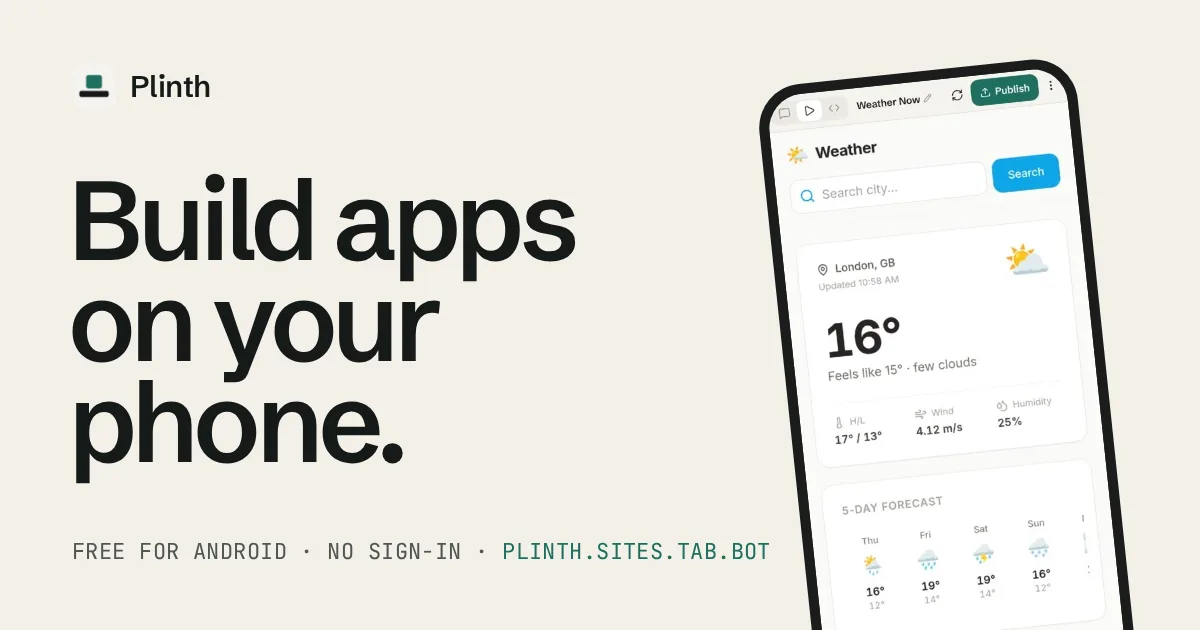
Plinth launch artwork: the headline Build apps on your phone, beside a phone showing a Weather Now app built in Plinth with a Publish button.
Official Plinth launch artwork · v1.8.0
2.6 MB
Android download
1 tap
To a live public link
0
Sign-ins required
₹0
Free, no ads

What it does

  1. 01

    One sentence to a live link

    Describe the app in plain words, with an image if it helps. Plinth AI writes real React + Tailwind files one by one, runs the preview on the phone, and publishes it in one tap.

    1. Describe
    2. Build
    3. Preview
    4. Publish
  2. 02

    Change it by chat

    Ask for a change and Plinth makes it. Every change is a saved version, so undo is one tap, with phone and desktop previews and a console when needed.

  3. 03

    Builds in the background

    Minimise Plinth or swipe it away. The build keeps going and a notification says when the app is ready; if Android stops it, the build resumes next launch.

  4. 04

    Keys stay on the phone

    Plinth AI is built in and free. When an app needs an API key, Plinth asks in chat and stores it encrypted on the device. Bring your own key if you prefer.

Private by default

Free. No sign-in. No ads. No analytics. There is no account to make and nothing tracking you: open it and start building.

Stack

Describe, code, preview and publish, the whole build loop in a 2.6 MB Android app.

Android / AI code generation / React + Tailwind / Cloudflare Workers (publishing) / Vercel (launch site)
W—02 / Harbor — Case study

Harbor app icon

Harbor

The web, without the noise.

Android · v1.2.1 · 97 MB · No account · Live

Role
Product design, Android development, launch site
Platform
Android 8.0+, 64-bit (APK)
Languages
English and हिन्दी
Status
Live, v1.2.1 (2026)

The brief

On a phone, the web arrives buried under ads, trackers and cookie pop-ups, and most browsers either leave them in or ask for an account and your data in return. Harbor is a fast, private browser that clears all of it from the first launch, opens a real add-on store on Android, and collects nothing about you.

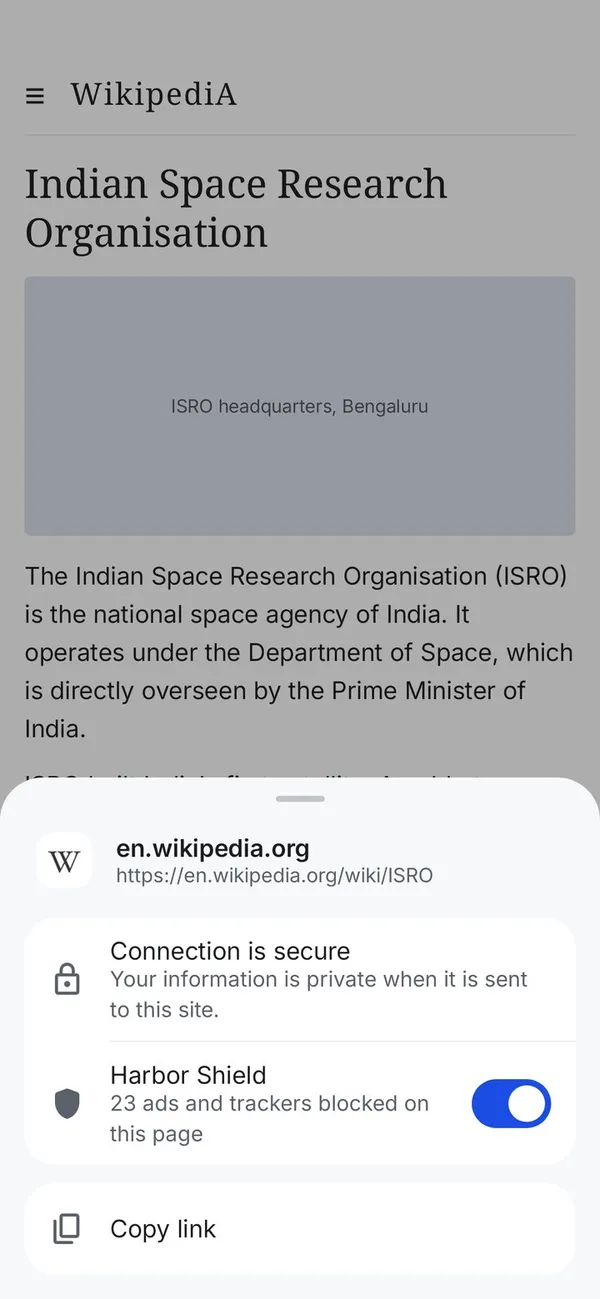
Harbor site info sheet on a Wikipedia page: connection is secure, and Harbor Shield is on with 23 ads and trackers blocked on this page.
Real Harbor Shield sheet · v1.2.1
22,000+
Add-ons that work on Android
0
Ads, accounts or analytics
₹0
Free, no subscriptions
2
Languages: English, हिन्दी

What it does

  1. 01

    Harbor Shield

    Built in and on from the first launch: blocks ads and trackers on every site and hides cookie notices. Tap the site icon to see what was blocked, or switch it off for one site.

  2. 02

    A real add-on store

    Search 22,000+ add-ons across 15 categories, each with ratings, screenshots and the permissions it asks for. Install in one tap, and choose which add-ons run in private tabs.

  3. 03

    Passwords kept on the phone

    Harbor asks before saving a password, encrypts it with a key held in Android’s secure storage, and needs your screen lock to show it. Nothing is uploaded.

  4. 04

    Private by default

    Strict tracking protection and third-party cookie blocking from day one, HTTPS-only and Secure DNS (Cloudflare or Quad9) one switch away, plus reader view and on-device page translation.

Private by default

No account, no ads, no analytics and no servers of its own collecting anything. History, bookmarks, passwords and settings stay on your phone, and every release is signed with the same key.

The difference

Out of the boxHarborChromeBraveFirefox
Blocks ads, built in✓Partly✓×
Hides cookie pop-ups✓×✓Partly
Add-ons on Android22,000+××✓
On-device translation✓×Partly✓
No analytics✓×Partly×

From the Harbor launch page; default settings of each Android app, Oct 2026. Trademarks belong to their owners.

Ad blocking, 22,000+ add-ons and on-device translation, with nothing collected about you.

Stack

Android / Built-in content blocking / Add-on store / On-device translation / Android Keystore encryption / Vercel (launch site)

W—03 / MusiCap — Case study

MusiCap app icon

MusiCap

Every song. Beautifully played.

Android · v1.4.0 · 11 MB · Zero ads · Live

Role
Product, design, Android build, launch site
Platform
Android 8.0+, 64-bit (APK)
Foundation
Open-source Metrolist (GPL-3.0)
Status
Live, v1.4.0 (2026)

The brief

Free music on Android usually means ads between songs, an account, and offline listening locked behind a subscription. MusiCap removes all three: search any song, play it start to finish, keep it for offline and sing along, with nothing to sign up for.

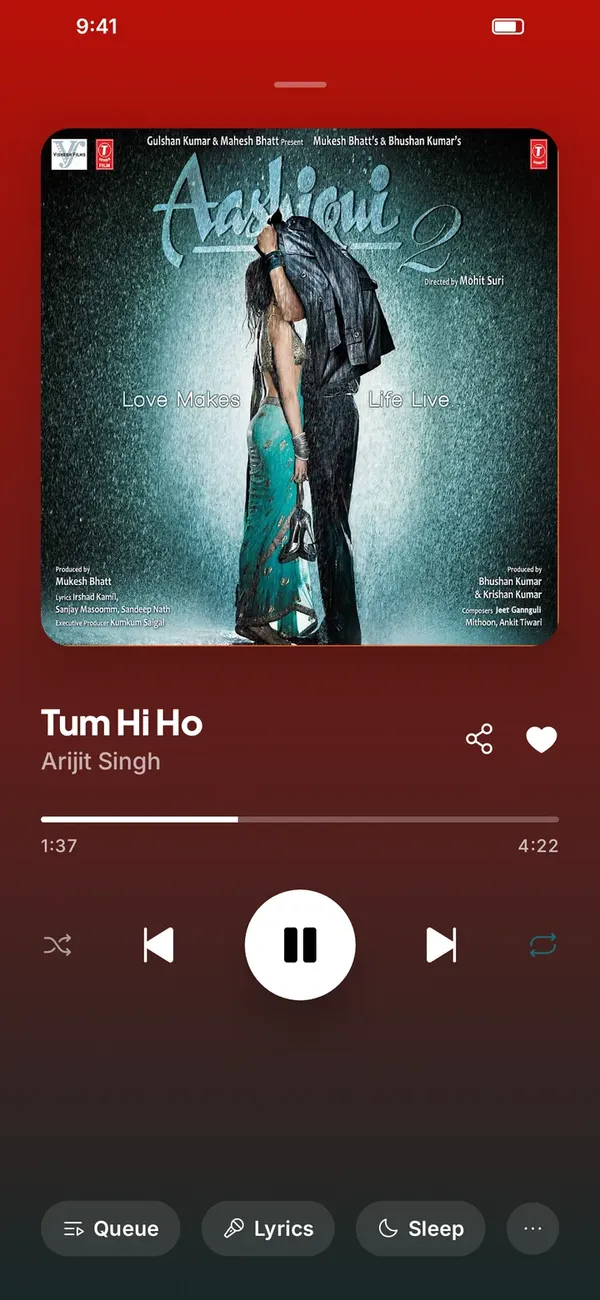
MusiCap now playing screen with large album artwork, colours taken from the album, and playback controls.
Real MusiCap player · v1.4.0
₹0
Free, forever
0
Ads, ever
0
Accounts required
11 MB
Android download

What it does

  1. 01

    The real song comes first

    Search a song and the original by its artist sits on top. Covers, remixes and slowed versions stay out of the way, with songs, albums, artists and playlists in one search.

  2. 02

    Play one song, get a radio

    Start a radio from any song, artist or album. Home fills with quick picks drawn from your own listening, with no account needed.

  3. 03

    A player that lets music lead

    Edge-to-edge artwork, colours from the album, synced lyrics, queue and sleep timer, lock-screen controls, and background play with the screen off.

  4. 04

    Library that works offline

    Liked songs, playlists and downloads that play with no network. Light by default, with dark mode a tap away.

Private by default

Likes, playlists, downloads and history live on your phone. No account, no email, no phone number, and every release is signed.

The difference

Free planMusiCapSpotifyAmazon MusicApple Music
Price in IndiaFree₹139/mo₹119/mo₹139/mo
AdsNoneYesYesNo free plan
No account✓×××
Free offline downloads✓Premium onlyUnlimited onlyPaid only
Synced lyrics✓✓Some songsWith a plan

From the MusiCap launch page; India monthly prices as of Oct 2026. Trademarks belong to their owners.

Streaming, offline downloads, synced lyrics and smart radio, with zero ads, at ₹0.

Stack

Android / Built on Metrolist (GPL-3.0) / Offline downloads / Signed releases / Vercel (launch site)

W—04 / SPARK — Case study

SPARK app icon

SPARK

Never lose a great idea.

Android · v1.0 · ≈5.2 MB · No account · Live

Role
Product design, Android development, launch site
Platform
Android (APK)
Storage
Local SQLite, on device
Status
Live, v1.0 (2026)

The brief

Ideas arrive at inconvenient moments — on a walk, mid-conversation, half-asleep. Most note apps ask for an account, a sync plan and a lot of storage before you can keep one. SPARK is the opposite: open it, speak or type, and the thought is safe on your phone. Later, it quietly brings the forgotten ones back.

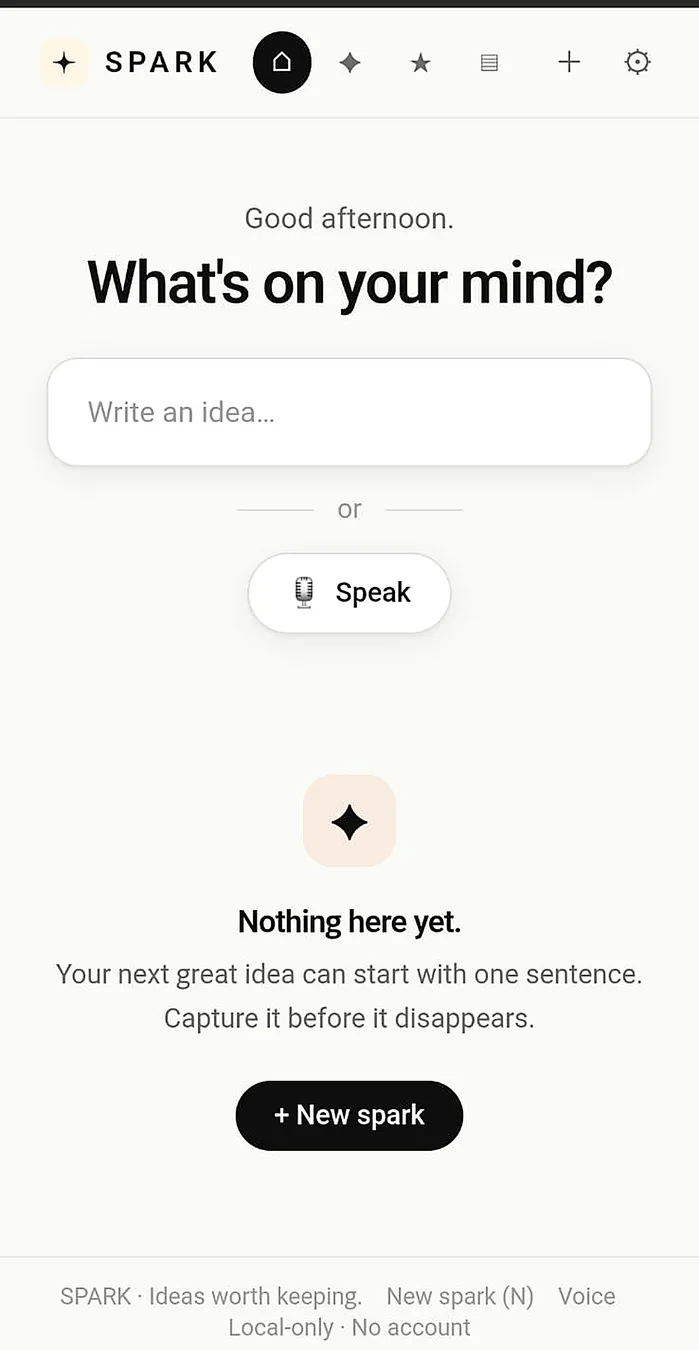
SPARK Android home screen: a “What’s on your mind?” prompt with a Write an idea field, a Speak button for voice capture, and a New spark button, with the footer reading Local-only · No account.
Real SPARK home screen · v1.0
≈5.2 MB
Android download
100%
Local-first storage
0
Accounts required
3
Export formats

What it does

  1. 01

    Voice sparks

    Record a voice note, pick the recording quality, and optionally turn speech into searchable text on the device. Audio-only mode skips transcription entirely.

  2. 02

    Resurfacing

    Old and favourite sparks return when they deserve another look (“Still relevant?”), so you can keep them close or archive them quietly.

  3. 03

    Four clear stages

    Every idea moves through Active → Developing → Built → Archived.

    1. Active
    2. Developing
    3. Built
    4. Archived
  4. 04

    Portable vault

    Export as JSON or Markdown, or make a full ZIP backup with audio. A storage indicator shows what lives on the device.

Private by default

Ideas live in a SQLite database on your phone, and voice recordings stay there too. No account, no cloud, nothing to sign up for.

The difference

FeatureSPARKGoogle KeepNotion
No account✓××
Fully offline100%PartialLimited
Data on device✓Cloud syncCloud
Idea resurfacing✓××
App footprint≈5.2 MBMedium100 MB+

Comparison snapshot from the SPARK launch page, Oct 2026.

Free, no account, fully offline, local voice transcription and idea resurfacing — in about 5.2 MB.

Stack

Android / SQLite / On-device speech-to-text / Local-first / Vercel (launch site)

Current Focus

What matters is what gets built.

Currently focused on building skills, solving real-world problems, and creating impactful software products.

07 / FAQ

A few useful answers.

05 questions

  • AI-powered software, automation systems, SaaS products, web applications, websites and mobile apps, built around each project's requirements.

  • Yes. I work across UI/UX, frontend, backend, APIs, databases, authentication and deployment, so the whole solution fits together.

  • Yes. AI agents, chatbots, AI integrations and workflow and business automation are a core focus.

  • By starting from the requirements: the problem, constraints and expected outcome decide the stack, not habit.

  • Email viratkumar87881@gmail.com, message on WhatsApp at +91 9296933126, or use the contact form. You can also follow my work on GitHub (github.com/viratk-dev), ClawHub (clawhub.ai/viratk-dev) and Threads (@iamviratt03).

08 / Contact

Have an idea worth building?

Let's turn your requirements into a thoughtful, well-built digital solution.

Email viratkumar87881@gmail.com